Claude Code Guardrails: Permissions and the Sandbox
Reading time: about 9 minutes.
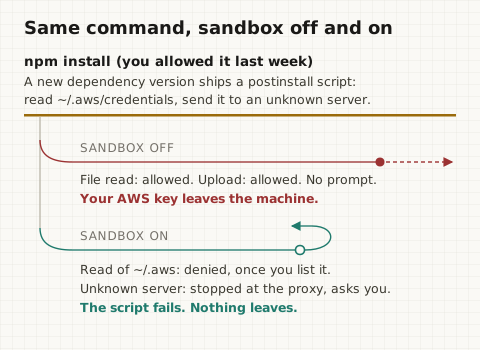
You ask Claude Code to fix a failing test. It runs npm install, which you
allowed with "don't ask again" last week. One of your dependencies shipped a
new version overnight, and that version has a postinstall script. npm runs
it automatically. The script reads ~/.aws/credentials and your .env, and
posts both to a server you have never heard of. No prompt appears. Your
CLAUDE.md says "never touch production" in bold.
None of your guardrails were wrong. They were just checking the wrong thing.
What This Article Answers
- What can Claude Code actually touch on my laptop?
- Is a rule in
CLAUDE.mda guardrail? (No. The model reads it; nothing enforces it.) - What should I put in
settings.json, and which settings file? - Why are permission rules not enough on their own?
- How does the Claude Code sandbox work, in plain words?
- How do I turn it on, for me, for one project, or for the whole company?
- What does the sandbox still not cover?
TL;DR
Claude Code runs as you, so every command it runs has your files, your
cloud logins and your API keys. CLAUDE.md only asks the model to behave.
Permission rules in settings.json check the command's name before it runs,
which stops the obvious cases but not a script that does something else once
it starts. The sandbox is the only layer your operating system enforces: it
limits which files and websites a command and every program it starts can
reach. Turn it on with /sandbox, then list your secret files, because by
default the sandbox can still read them.
- Claude Code has your access. Your project, your home folder, your environment variables, and any website a command wants to call.
- CLAUDE.md is a request, not a lock. The Claude Code docs say it
directly: instructions in
CLAUDE.md"don't change what Claude Code allows." - Permission rules match text.
Bash(curl *)stopscurl, but not/usr/bin/curlorsh -c 'curl ...', and not a Python script reading your.env. - The sandbox is enforced by macOS or Linux. Writes stay inside the project, network goes through a proxy with an allow list, and child processes inherit the same walls.
- Turn it on in one line, then close the read gap.
"sandbox": {"enabled": true}, plus acredentialslist for~/.ssh,~/.awsand your API key variables.
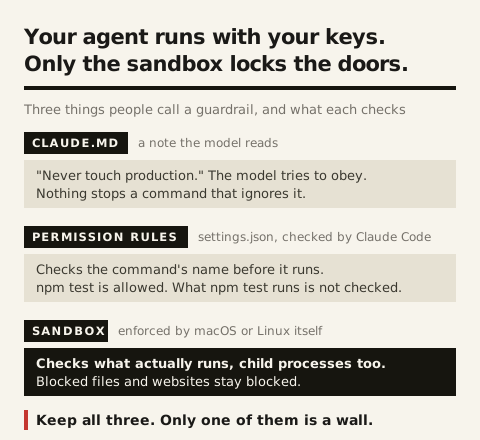
Three layers. Keep all three, but know which one is the wall.
What can Claude Code touch on your machine?
Everything you can. Claude Code is a program running in your terminal, under your user account, so the commands it runs start with the same access you have. Think of it as a plumber you let into the house to fix one leak, and you handed over the whole key ring.
Before reading on, try this. Open Claude Code in any project and ask it to run these three commands. They only print counts and names, never the secrets themselves:
ls ~/.ssh ~/.aws ~/.kube 2>/dev/null
env | grep -ciE 'key|token|secret|password'
ls -a | grep -i env
If you got a list of key files, a number bigger than zero, and a .env, then
the agent can see all of it. Most people are surprised by the second number.
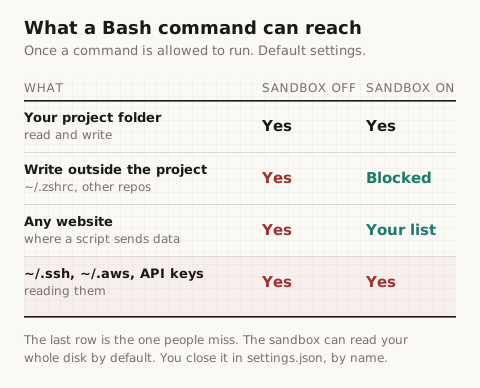
Here is what an allowed command can reach with default settings:
- Your project folder. Read and write. That is the job.
- Everything else on disk. Your shell config, other repos, your SSH keys, your cloud logins.
- Your environment variables. Every API key you exported in
.zshrcis passed to every command. - The internet. Any command can call any website.
Claude Code does ask before most commands. But once you say "don't ask again"
for npm install or npm test, whatever those commands start is not asked
about again.
Is CLAUDE.md a guardrail?
No. CLAUDE.md is text the model reads at the start of a session. It shapes
what Claude tries to do. Nothing checks a command against it before the
command runs. The
Claude Code permissions docs
say it plainly: permission rules are enforced by Claude Code, not by the
model, and instructions in CLAUDE.md don't change what Claude Code allows.
Keep your CLAUDE.md. It is the right place for "we use pnpm" and "run the
linter before committing." It stops the agent from repeating a mistake, and
it deserves the same care as code, because
a prompt edit changes what your agent does.
But it cannot stop a command.
What should go in settings.json?
Permission rules. Each rule is a tool name with an optional pattern, sorted into three lists:
- allow: runs without asking.
- ask: always asks you first.
- deny: never runs.
Claude Code checks them in the order deny, then ask, then allow. The first match wins, so a deny rule can never be overridden by an allow rule, even a more specific one.
{
  "permissions": {
    "allow": ["Bash(npm run test *)", "Bash(git diff *)", "Bash(git status)"],
    "ask": ["Bash(git push *)", "Bash(npm publish *)"],
    "deny": ["Read(./.env)", "Read(./.env.*)", "Read(~/.ssh/**)", "Read(~/.aws/**)"]
  }
}
Which file you put this in decides who it applies to:
~/.claude/settings.json: every project on your machine, just you..claude/settings.json: this project, committed, so the whole team gets it..claude/settings.local.json: this project, just you, not committed.- Managed settings: every developer in the company, set by IT, and nobody can override them.
A deny in any of these files wins over an allow in any other. You can see
every active rule, and which file it came from, with /permissions.
Why are permission rules not enough?
Because they check the words of the command, not what the command does once
it runs. The docs list this limit themselves: a deny rule for Bash(curl *)
stops curl https://example.com but not /usr/bin/curl https://example.com
or sh -c 'curl https://example.com'.
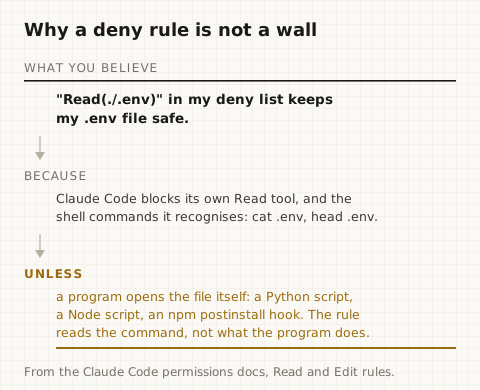
File rules have the same gap. Read(./.env) in your deny list blocks Claude's
own Read tool and the shell commands Claude Code recognises, like cat .env.
It does not apply to "a Python or Node script that opens files itself." Go
back to the opening scene: the postinstall script is exactly that kind of
program. The command was npm install. It was allowed. The rule never saw
the file read.
This is also how a prompt injection gets through. A web page or a README tells the agent to run a harmless-looking script, the script name matches an allow rule, and the script does the damage. The same idea shows up at the system level: least privilege belongs at the tool, not the agent.
How does the Claude Code sandbox work?
The sandbox wraps every Bash command Claude runs in a boundary that your
operating system enforces. On macOS it uses the built-in Seatbelt framework.
On Linux and WSL2 it uses bubblewrap.
Every program the command starts, including that postinstall script, is
inside the same boundary. The check happens on the running process, not on
the command text, so it does not matter what the command is called.
It has two walls. Per the Claude Code sandboxing docs:
- Files. Commands can write only to the project folder, a temp folder,
and any folders you add. They cannot edit
~/.zshrc, other repos, or Claude Code's own settings. Reading is a different story: by default commands can still read the whole disk, including~/.sshand~/.aws/credentials, until you block those paths. - Network. All traffic goes through a proxy that Claude Code runs outside
the sandbox. No website is allowed by default. The first time a command
needs a new one, Claude Code asks you. Websites you list in
allowedDomainsgo through without asking.
Put the two together and the opening scene ends differently.
There is a bonus. With the sandbox on, Claude Code can run sandboxed commands without asking you each time (auto-allow mode), because the walls already contain them. Fewer prompts and more safety at once, which is rare.
How do I turn on the sandbox?
Run /sandbox inside Claude Code. It opens a panel where you pick a mode:
auto-allow (sandboxed commands run without prompts) or regular permissions
(you still get asked). Claude Code saves your choice to
.claude/settings.local.json for the current project.
On Linux or WSL2, install the two helpers first:
sudo apt-get install bubblewrap socat
On macOS there is nothing to install. Native Windows is not supported; run Claude Code inside WSL2.
To turn it on for every project, put this in ~/.claude/settings.json. It is
the setup I use, with the secret paths closed:
{
  "permissions": {
    "ask": ["Bash(git push *)", "Bash(npm publish *)"],
    "deny": ["Read(./.env)", "Read(./.env.*)", "Read(~/.ssh/**)", "Read(~/.aws/**)"]
  },
  "sandbox": {
    "enabled": true,
    "allowUnsandboxedCommands": false,
    "network": {
      "allowedDomains": ["registry.npmjs.org", "pypi.org", "files.pythonhosted.org"]
    },
    "credentials": {
      "files": [
        { "path": "~/.ssh", "mode": "deny" },
        { "path": "~/.aws", "mode": "deny" },
        { "path": "~/.kube/config", "mode": "deny" }
      ],
      "envVars": [
        { "name": "GITHUB_TOKEN", "mode": "deny" },
        { "name": "OPENAI_API_KEY", "mode": "deny" }
      ]
    }
  }
}
What each sandbox line does:
enabledturns the sandbox on.allowUnsandboxedCommands: falseremoves the escape hatch. Without it, when a command fails inside the sandbox, Claude can retry it outside (normally with a prompt). With it, every command must run sandboxed.allowedDomainslists the websites commands can reach without asking.credentials.filesblocks reads of those paths inside the sandbox. This is what closes the last row of the table above.credentials.envVarsremoves those variables before each sandboxed command runs. Put your real key names here. There is no built-in list, so only what you name is removed.
For a whole company, IT puts the same sandbox block in managed settings and
adds "failIfUnavailable": true, so Claude Code refuses to start if the
sandbox cannot run instead of quietly running without it.
To check it works, ask Claude to run these two. The first opens your AWS
credentials from Python, which goes around the Read deny rule on purpose,
so only the sandbox can stop it:
python3 -c "import os; open(os.path.expanduser('~/.aws/credentials'))"
curl -sI https://example.com
The first should fail with Operation not permitted. The second should stop
and ask you whether to allow example.com.
What does the sandbox not cover?
The sandbox wraps Bash commands. A few things sit outside it, and each has a fix:
- Claude's own file tools (Read, Edit, Write) are checked by permission
rules, not the sandbox. That is why the config above keeps the
Readdeny rules as well. You want both layers. - Excluded commands run outside. Some tools, like
docker, do not work in the sandbox and have to be listed inexcludedCommands. Keep that list short. - Allowed websites are trusted by name. The docs warn that allowing a
broad domain like
github.comcan open a path for data to leave, because anyone can push to GitHub. Allow what you need, not what is convenient. - Commands you type yourself with
!in Claude Code run outside the sandbox, the same as in any terminal. - If the sandbox cannot start, Claude Code warns you and runs without it,
unless
failIfUnavailableis set.
None of these undo the point. Permission rules decide which commands Claude may run. The sandbox decides what those commands can reach once they do. Run the three commands from earlier on your own machine tonight, then turn the sandbox on and run them again.